> ## Documentation Index
> Fetch the complete documentation index at: https://docs.prigeex.com/llms.txt
> Use this file to discover all available pages before exploring further.
# Add Liquidity (Concentrated)
Concentrated liquidity lets you **focus** your tokens in a price range you choose, so they earn far more
trading fees than they would spread across every price. In return, your position needs a
little attention. Each Concentrated position is represented as an **NFT** you can see and manage.
New to this? Read [Provide Liquidity: Classic vs Concentrated](liquidity-v2-vs-v3) and
[Impermanent Loss, Explained](../learn/impermanent-loss) first.
## Before you start
* Your wallet is [connected](../getting-started/connect-to-prigeex) and on Arbitrum One
* You hold the two tokens of the pair (or one that you can split)
* You have a little **ETH** for the network fee
## How to add Concentrated liquidity
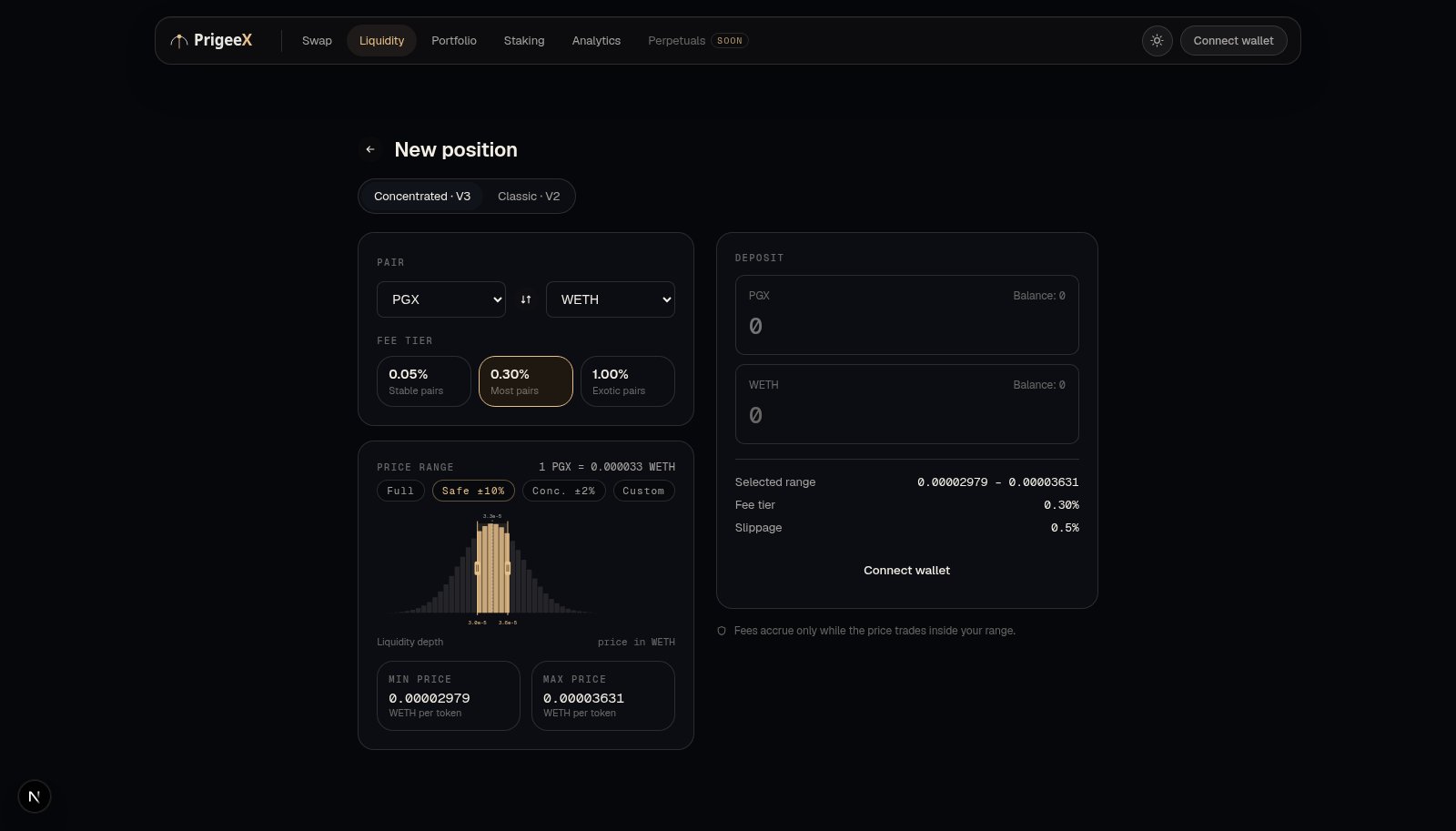
1. Go to the **Liquidity** page and choose **Concentrated**.
2. Select the **token pair** and a **fee tier** (see below).
3. Choose your **price range**. You can use a preset or set it manually:
* **Full Range**: behaves like Classic, spread across all prices. Safest, lowest earning.
* **Safe (±10%)**: a wide range around the current price. Balanced.
* **Concentrated (±2%)**: a tight range near the current price. Highest earning, needs
the most attention.
4. Enter your token amounts. An **interactive chart** shows the current price and your
selected range.
5. **Approve** the tokens in your wallet if prompted (one-time per token).
6. Click **Add** and **confirm**. You receive a **position NFT** representing this Concentrated
position.
 ## Choosing a fee tier
Each pool has a fee level that traders pay and you earn. Common tiers:
* **0.05%**: best for very stable pairs (e.g. two stablecoins)
* **0.30%**: a good default for most pairs
* **1.00%**: for volatile or exotic pairs
Higher fee tiers earn more per trade but may see less trading volume. When in doubt, 0.30%
is a sensible starting point for most pairs.
## The key idea: "in range" vs "out of range"
Your Concentrated position only earns fees while the market price is **inside** the range you chose:
* 🟢 **In range**: the current price is within your band. You're actively earning fees.
* ⚪ **Out of range**: the price has moved past your band. You've stopped earning until
the price returns or you adjust your range.
This is the trade-off of Concentrated: a tighter range earns more while in range, but goes out of
range more easily. A wider range earns less but stays active longer.
**Tip:** If you don't want to babysit a position, pick **Safe (±10%)** or **Full Range**.
If you're actively watching the market, **Concentrated (±2%)** can earn the most.
## How you earn (and collecting fees)
Fees you earn accumulate on your position and are shown as **unclaimed fees**. Unlike Classic,
in Concentrated pools you **collect** these fees whenever you like, without withdrawing your liquidity.
See [Manage Your Positions](manage-positions).
## Managing the position afterward
From [Manage Your Positions](manage-positions) you can:
* **Collect** your unclaimed fees at any time
* **Increase** liquidity (add more)
* **Remove** liquidity (partially or fully)
* **See** whether the position is in or out of range
## Things to keep in mind
* **Out-of-range positions earn nothing** until the price comes back or you re-set the
range. Check your positions periodically.
* **Impermanent loss still applies**, and can be more pronounced with tight ranges.
[Learn why →](../learn/impermanent-loss)
* **Each position is an NFT.** It's yours, held in your wallet; don't send it away
unless you intend to transfer the position itself.
## Prefer something hands-off?
Then Classic may suit you better: [Add Liquidity (Classic)](provide-liquidity-v2).
## Choosing a fee tier
Each pool has a fee level that traders pay and you earn. Common tiers:
* **0.05%**: best for very stable pairs (e.g. two stablecoins)
* **0.30%**: a good default for most pairs
* **1.00%**: for volatile or exotic pairs
Higher fee tiers earn more per trade but may see less trading volume. When in doubt, 0.30%
is a sensible starting point for most pairs.
## The key idea: "in range" vs "out of range"
Your Concentrated position only earns fees while the market price is **inside** the range you chose:
* 🟢 **In range**: the current price is within your band. You're actively earning fees.
* ⚪ **Out of range**: the price has moved past your band. You've stopped earning until
the price returns or you adjust your range.
This is the trade-off of Concentrated: a tighter range earns more while in range, but goes out of
range more easily. A wider range earns less but stays active longer.
**Tip:** If you don't want to babysit a position, pick **Safe (±10%)** or **Full Range**.
If you're actively watching the market, **Concentrated (±2%)** can earn the most.
## How you earn (and collecting fees)
Fees you earn accumulate on your position and are shown as **unclaimed fees**. Unlike Classic,
in Concentrated pools you **collect** these fees whenever you like, without withdrawing your liquidity.
See [Manage Your Positions](manage-positions).
## Managing the position afterward
From [Manage Your Positions](manage-positions) you can:
* **Collect** your unclaimed fees at any time
* **Increase** liquidity (add more)
* **Remove** liquidity (partially or fully)
* **See** whether the position is in or out of range
## Things to keep in mind
* **Out-of-range positions earn nothing** until the price comes back or you re-set the
range. Check your positions periodically.
* **Impermanent loss still applies**, and can be more pronounced with tight ranges.
[Learn why →](../learn/impermanent-loss)
* **Each position is an NFT.** It's yours, held in your wallet; don't send it away
unless you intend to transfer the position itself.
## Prefer something hands-off?
Then Classic may suit you better: [Add Liquidity (Classic)](provide-liquidity-v2).